Tuesday, 31 July 2012

Deploy TimerJobs to SharePoint 2007 farm

Working with SharePoint 2007 is full with excitement, don't you agree? I am lucky enough to be an advanced SharePoint developer + admin. Today, I am going to share one trick on deploying TimerJobs to MOSS 3.0.

After executing a list of "stsadm" commands, please be sure to recycle the MOSS Timer service, and do a recycle of your IIS app pools.

It took me a day for figure out why the newly deployed timerjob wasn't running, as there is no any system trace available to you. Hope it help.

show your appreciation by clicking on those Google ads

Friday, 23 March 2012

MVC 4 Web API access Session

It's not recommended to use Session  in Web API for various of good reasons. However, in case you're still so interested to access Session for any business needs, here is a quick solution to allow accessing Session in Web API.

 
// In global.asax
public class MvcApp : System.Web.HttpApplication
{
 public static void RegisterRoutes(RouteCollection routes)
 {
  var route = routes.MapHttpRoute(
   name: "DefaultApi",
   routeTemplate: "api/{controller}/{id}",
   defaults: new { id = RouteParameter.Optional }
  );
  route.RouteHandler = new MyHttpControllerRouteHandler();
 }
}

// Create two new classes
public class MyHttpControllerHandler : HttpControllerHandler, IRequiresSessionState
{
 public MyHttpControllerHandler(RouteData routeData): base(routeData)
 {
 }
}
public class MyHttpControllerRouteHandler : HttpControllerRouteHandler
{
 protected override IHttpHandler GetHttpHandler(RequestContext requestContext)
 {
  return new MyHttpControllerHandler(requestContext.RouteData);
 }
}

// Now Session is visible in your Web API
public class ValuesController : ApiController
{
 public string GET(string input)
 {
  var session = HttpContext.Current.Session;
  if (session != null)
  {
   if (session["Time"] == null)
    session["Time"] = DateTime.Now;
   return "Session Time: " + session["Time"] + input;
  }
  return "Session is not availabe" + input;
 }
}


Source is here.

Thursday, 22 March 2012

First Cloud OS - Solaris 11

Oracle has released Solaris 11 and claimed it as the first Cloud OS in the market. Looking forward to having my hands on it.

Details of Oracle Solaris 11 can be found on here

Monday, 13 February 2012

Best IDE tools/plug-ins for eclipse Java development

Looking for best IDE integrated tools/plug-ins for eclipse Java development just like Resharper or CodeRush for Visual Studio .Net platform. Anyone has few suggestions?

Monday, 30 January 2012

javascript: base64 encoding

It's quite easy to implement. See the code snippets below


<script>
    base64Keys = "ABCDEFGHIJKLMNOPQRSTUVWXYZabcdefghijklmnopqrstuvwxyz0123456789-_=";
    base64Encode = function(input) {
      var chr1, chr2, chr3, enc1, enc2, enc3, enc4, i, output;
      output = "";
      i = 0;
      input = utf8Encode(input);
      while (i < input.length) {
        chr1 = input.charCodeAt(i++);
        chr2 = input.charCodeAt(i++);
        chr3 = input.charCodeAt(i++);
        enc1 = chr1 >> 2;
        enc2 = ((chr1 & 3) << 4) | (chr2 >> 4);
        enc3 = ((chr2 & 15) << 2) | (chr3 >> 6);
        enc4 = chr3 & 63;
        if (isNaN(chr2)) {
          enc3 = enc4 = 64;
        } else if (isNaN(chr3)) {
          enc4 = 64;
        }
        output = "" + output + (base64Keys.charAt(enc1)) + (base64Keys.charAt(enc2)) + (enc3 < 64 ? base64Keys.charAt(enc3) : '') + (enc4 < 64 ? base64Keys.charAt(enc4) : '');
      }
      return output;
    };

    utf8Encode = function(string) {
      var c, s, utftext, _i, _len, _ref;
      string = string.replace(/\r\n/g, "\n");
      utftext = "";
      _ref = string.split('');
      for (_i = 0, _len = _ref.length; _i < _len; _i++) {
        s = _ref[_i];
        c = s.charCodeAt(0);
        if (c < 128) {
          utftext += String.fromCharCode(c);
        } else if (c > 127 && c < 2048) {
          utftext += String.fromCharCode((c >> 6) | 192);
          utftext += String.fromCharCode((c & 63) | 128);
        } else {
          utftext += String.fromCharCode((c >> 12) | 224);
          utftext += String.fromCharCode(((c >> 6) & 63) | 128);
          utftext += String.fromCharCode((c & 63) | 128);
        }
      }
      return utftext;
    };
</script>
 

Friday, 27 January 2012

Command-line to launch Android emulator.

Assuming Android SDK has been successfully installed and AVD of your target android version was created. For Window 7 user, the install path is likely at "c:\Program Files\Android\android-sdk\tools\". If you have problems on above step, please refer to Android developer site or email me. The command line to launch your emulator, for example IceCream.

c:\>"C:\Program Files\Android\android-sdk\tools\emulator.exe" -avd IceCream

Javascript to request GPS location from web page

There is no direct method natively built in Javascript stack. Don't give up though. I am giving your few lines of code to provide the result you look for. The code runs well on IE9, Chrome, FireFox, Safari on both PC and mobile device platforms.

 
function requestGeoLocation() {
 if (navigator.geolocation) {
 navigator.geolocation.getCurrentPosition(function(loc){
 // do nothing
 //document.getElementById('myloc').innerHTML = 'Location: ' + 
 //    loc.coords.latitude + ', ' +
 //    loc.coords.longitude;
    
        }, function() { alert('request denied or something went wrong.');});
} else { 
 alert('GPS is supported.'); 
}
 

Tuesday, 24 January 2012

bada mobile platform for C++ and Flash developersd

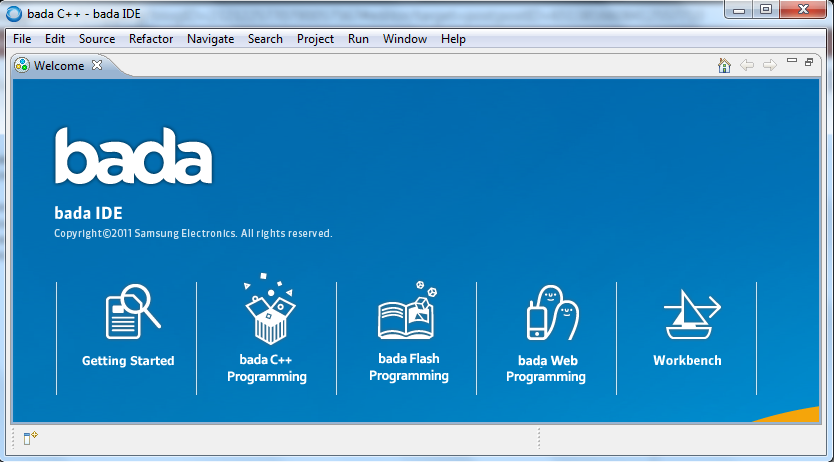
bada is Korean name meaning "ocean" or "sea". As you could guess, it's provided by another mobile device manufacture outside the North American region, called Samsung. Many mobile/tablet developers probably already knew much as objective-c and android. If you were hard core C++ fans like me, you probably want to take look at bada which provides you a ever familiar syntax and powerful OOD support. bada's home site is here.

bada IDE is eclipse CDT-base (C/C++ Development Tools). So you don't have to learn everything from the beginning if knows eclipse.


A new project wizard dialog pops up from "File->New->bada C++/Flash Application Project"

Thursday, 12 January 2012

The database principal owns a schema in the database, and cannot be dropped

Encounter this while restoring a SQL Server database backup from one server to another, and trying to delete a user comes from the backup.

The workaround is to list all the schema that user owns by following script:
SELECT name FROM  sys.schemas WHERE principal_id = USER_ID('usertodelete');

then remove or transfer those schema owned by that user to another user, such as dbo by this script:
alter authorization on schema::schema_name to dbo;

Saturday, 31 December 2011

Microsoft Managed Extensibility Framework (MEF)

Managed Extensibility Framework (MEF) is a composition layer for .NET that improves the flexibility, maintainability and testability of large applications. MEF can be used for third-party plugin extensibility, or it can bring the benefits of a loosely-coupled plugin-like architecture to regular applications.


MEF is a part of the Microsoft .NET Framework, with types primarily under theSystem.ComponentModel.Composition.* namespaces.

  • MEF has shipped with .NET 4.0 and Silverlight 4
  • MEF 2 is under development and can be downloaded in source code and binary form from this site

For more information, click here.


Saturday, 24 December 2011

Useful Git Terms


  • master: this is the main code branch, equivalent to trunk in Subversion. Branches are generally created off of master.
  • origin: the default remote repository that all your branches are pull'ed from and push'ed to. This is defined when you execute the initial git clone command.
  • fast-forward: the process of bringing a branch up-to-date with another branch, by fast-forwarding the commits in one branch onto the other.
  • rebase: the process by which you cut off the changes made in your local branch, and graft them onto the end of another branch.
  • unpublished vs. published branches: an unpublished branch is a branch that only exists on your local workstation, in your local repository. Nobody but you know that branch exists. A published branch is one that has beenpush'ed up to github, and is available for other developers to checkout and work on.

Thursday, 22 December 2011

NuGet Install Castle.Windsor and factilies for NLog or log4net

Install the following Castle packages from NuGet command line.
  1. PM>  install-package Castle.Windsor 
  2. PM>  install-package Castle.Core-NLog 
  3. PM> install-package Castle.Core-log4net
  4. PM> install-package Castle.LoggingFacility

 Notes: that Castle.Core-NLog has the Castle.Facilities for NLog.

Thursday, 8 December 2011

Validation of viewstate MAC failed,in hosting on a web farm

If a web application is hosted by a web farm or cluster, you would experience this exception if you didn't set up the web.config correctly. The solution for resolving this exception is to ensure the configuration specifies the same validation key and validation algorithm in every single web.config in your deployment. AutoGeneration by default cannot be used in a cluster environment. Below is the sample machinekey config entry for your web.config
 
<configuration>
    <appSettings/>
    <connectionStrings/>
    <system.web>
        <machineKey  validationKey='44DB9132AD56D581F6DBFDD8F09EDFD167B75283771DB3241804B0F03602EBACF6349C724FAC64785F60653EC9F9CA20A4D377387A1677704525FE9147CE6AC3' decryptionKey='C77E66D32F8F554C507DDEC6DA2A1A470B5EE195DA584EDD' validation='SHA1'/>
    </system.web>
</configuration>
 

Sunday, 13 November 2011

Manage IIS Application Pool from .Net C# code

  .Net framework provides a very easy-to-use API wrapper class, ServerManager, to help manage IIS system from any .Net application using either C# or VB.net. Below C# code snippet demonstrates how to restart/recycle a given AppPool in IIS.
     
    public void RestartAppPool(string appPool)
        {
            try
            {
                logger.Info("Restarting app pool: " + appPool);

                // Recycle app pool
                using (var manager = new ServerManager())
                {
                    var pool = manager.ApplicationPools[appPool];

                    if (pool != null) 
                    {
                        Process process = null;

                        if (pool.WorkerProcesses.Count > 0)
                        {
                            process = Process.GetProcessById(pool.WorkerProcesses[0].ProcessId);
                        }

                        if (pool.State == ObjectState.Stopped)
                            pool.Start();
                        else
                            pool.Recycle();

                        // clean up any worker thread created by app pool
                        if (process != null)
                        {
                            while (!process.HasExited)
                            {
                                Thread.Sleep(10);
                            }

                            process.Dispose();
                        }
                    }
                }

                //logger.Info("Successfully restarted app pool: " + appPool);
            }
            catch (Exception ex)
            {
               // logger.Error("Restart app pool error: " + ex);
            }
        }
 

Tuesday, 8 November 2011

JQuery extension: numeric only input text

Here is the simply but re-usable approach, IMO: create an jquery numeric extension and then use the numeric extension in your input text box:

 
// numeric extension
jQuery.fn.onlyNumeric = function () {
    return this.each(function () {
        $(this).keydown(function (e) {
            var key = e.which || e.keyCode;
            if (!e.shiftKey && !e.altKey && !e.ctrlKey &&
                key >= 48 && key <= 57 || key >= 96 && key <= 105 ||
                key == 8 || key == 13 || key == 46 ||
                key == 35 || key == 36 || key == 37 || key == 39)
                return true;
            return false;
        });
    });
};
// use it in your input text box
$('#input_box').onlyNumeric();
 

Wednesday, 2 November 2011

HTML meta tags for mobile or regular sites

For mobile site specifically:
<meta content='HandheldFriendly' name='true' />
<meta content='width=device-width; initial-scale=1.0; maximum-scale=1.0; user-scalable=0;' name='viewport' />
<meta name="viewport" content="width=device-width" />
<meta content='MobileOptimized' name='width' />
<meta content='HandheldFriendly' name='true' />
<meta name="google-site-verification" content="wYqVbCtxN_YM1tLTZmGkUDbEmNrSjpB7hBNp5_Avsvs" />


General meta tags for all sites:

<meta name="keywords" content="key words of you site" />
<meta name="description" content="description of your site" />

<meta http-equiv="Content-Typ" content="text/html; charset=utf-8" />
<meta http-equiv="X-UA-Compatible" content="IE=8" />


Friday, 21 October 2011

Load testing ajax application using Visual Studio 2010

In order to do this, you need to extend Visual Studio Web Performance Test  with your own Extraction and/or Validation Rule. Visual Studio 2010, which my current working copy, has all interfaces provided for the needed customizations.

Here is an official tutorial for Creating a Custom Extraction Rule, which can lead you to the place where you can find all useful information and a real code example.

For java users, you may want to explore HtmlUnit platform.

Wednesday, 19 October 2011

Avoid InfoWindow from shifting Google Maps

It's kind of inconsistent in some cases that Google InfoWindow would shift the map while panning. That's a huge user experience if this map behaviour is not your intention. There a couple ways to resolve it, either close the InfoWindow when panning the map way far causing it invisible, or set the proper value to an attribute of InfoWindow, which I believe it is the easiest and most solid solution. Here is the code snippet for the 2nd solution.

 
var infoWin = new google.maps.InfoWindow({disableAutoPan: true});
 

Tuesday, 18 October 2011

Get Ready for Android App Development

Being excited about mobile application and open source platform? Apple or Android? Personally I like both platforms but more lean to Android as I don't have any "expensive" Apple computer. Would be nice if I could get a sponsor. So Android App is my target for contributing to the community.

To get ready for your Android App development, you need the following stuff.
  1. JDK, any version since1.6.x or later and can be downloaded from here.
  2. Android SDK, and it can be downloaded from here.
  3. Eclipse IDE (recommended but not necessary), preferable to download Java EE Developer version. 
  4. Download and install Android Development Tools (ADT) plug-in for Eclipse.
  5. Add Android platforms to development environment.
    • From Eclipse, go to Window -> Android SDK and AVD Manager.
    • On Windows, double click the SDK Manager.exe file at the root fo the Android SDK directory.
    • On Mac or Linux, open a terminal and navigate to the tools/ directory in the Android SDK, then execute command: android
Now, you should be ready to get your hands wet on your first Android App development, Hello Word, for example. :)

For more information, you can always go to Android official home site for developers.


Sunday, 16 October 2011

Convert Latitude and Longitude to android.maps.GeoPoint

Use the following code snippets


GeoPoint point = new GeoPoint((int)(latitude * 1e6), (int)(longitude * 1e6));